
How to make a board-ready financial presentation with AI
By MacrosLM Team · Reviewed by Damira Baigozha, ex-PwC Valuation & M&A Advisory Expert
Prepping the quarterly board deck is one of the most grueling exercises in corporate finance — days of pulling trial balances, reconciling variance reports, and rekeying numbers into slides, only for the data to go stale by the meeting. This guide shows a faster, defensible path: point specialized FP&A agents at your trial balances, budget files, and GL exports and get back a board presentation where every figure traces to its source. The strategic read stays yours; the rekeying doesn't have to.
Why board decks eat so much time
A board deck consolidates numbers from across the close: trial balances, budget-vs-actual workbooks, the cash model, headcount plans, and peer benchmarks. Reconciling all of it and turning it into clean slides is where the days go, and every restated figure means re-checking every slide it touches before the meeting.
Where generic AI tools fall short
General-purpose AI tools like ChatGPT and Claude are genuinely capable, and useful for plenty of tasks. For a board deck specifically, three gaps tend to bite:
- Numbers aren't tied to your books. A general model can misread accounting logic or a budget-vs-actual variance, and nothing flags it, because the output isn't bound to your GL.
- Nothing to defend a figure with. When a director asks which cost centers drove an opex spike, a generic generator can't point to the accounts behind the number.
- Generic layouts. Output tends to be plain bullet slides rather than a data-dense presentation in your corporate brand.
A finance-specialized workspace closes those gaps: figures derived from your books, a citation on each one, and slides in your house style.
What you'll produce
An executive board deck featuring:
- Source-linked financial summaries: executive P&L, budget-vs-actual variance, operating margin bridges, and a 13-week cash runway.
- Line-item traceability: every figure carries a clickable citation that links to the exact GL row, ERP cell, or source page, with the reasoning shown.
- Brand alignment: slides formatted to your company's colors, typography, and layout.
The flow: ERP exports, trial balances, and budget models → an FP&A slide agent reconciles and drafts → a board presentation with clickable evidence behind every figure. It's the same source-linked approach behind a McKinsey-style research deck built from 100+ raw PDFs.
Step 1: Ingest your raw financial exports
Open a new task and upload the files behind the deck: raw trial balances, monthly budget variance workbooks, GL transaction dumps, and headcount models. MacrosLM handles raw, uncleaned formats, including Excel, CSV, scanned invoices, and PDF statements (up to 25 MB per file).
You can also connect live sources to pull peer benchmarks and macro context alongside your own files — SEC EDGAR and Companies House for public filings, FRED and World Bank for macro and rate benchmarks, plus web search for real-time market news.
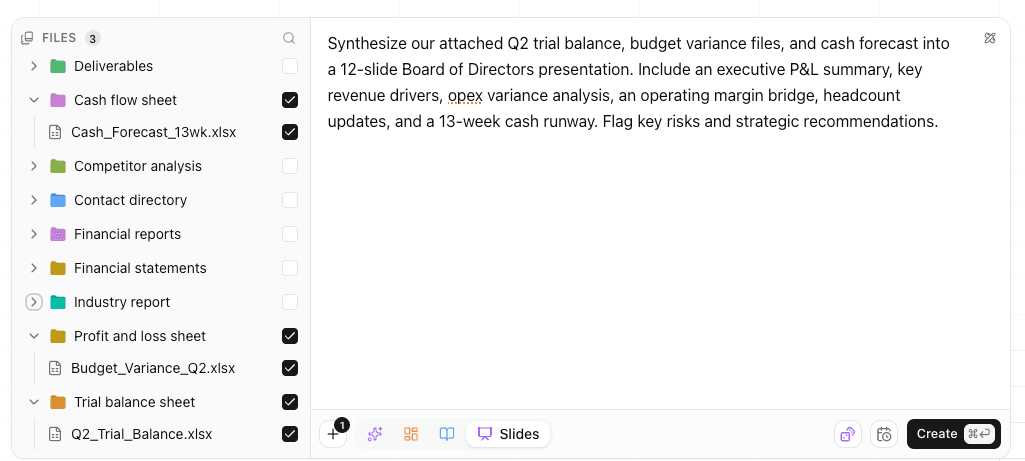
Pro tip: don't clean up blank rows first. Drag raw ERP dumps alongside your 12-month budget model and let the agents reconcile across them.
Step 2: Brief the deck, or pick a ready-made agent
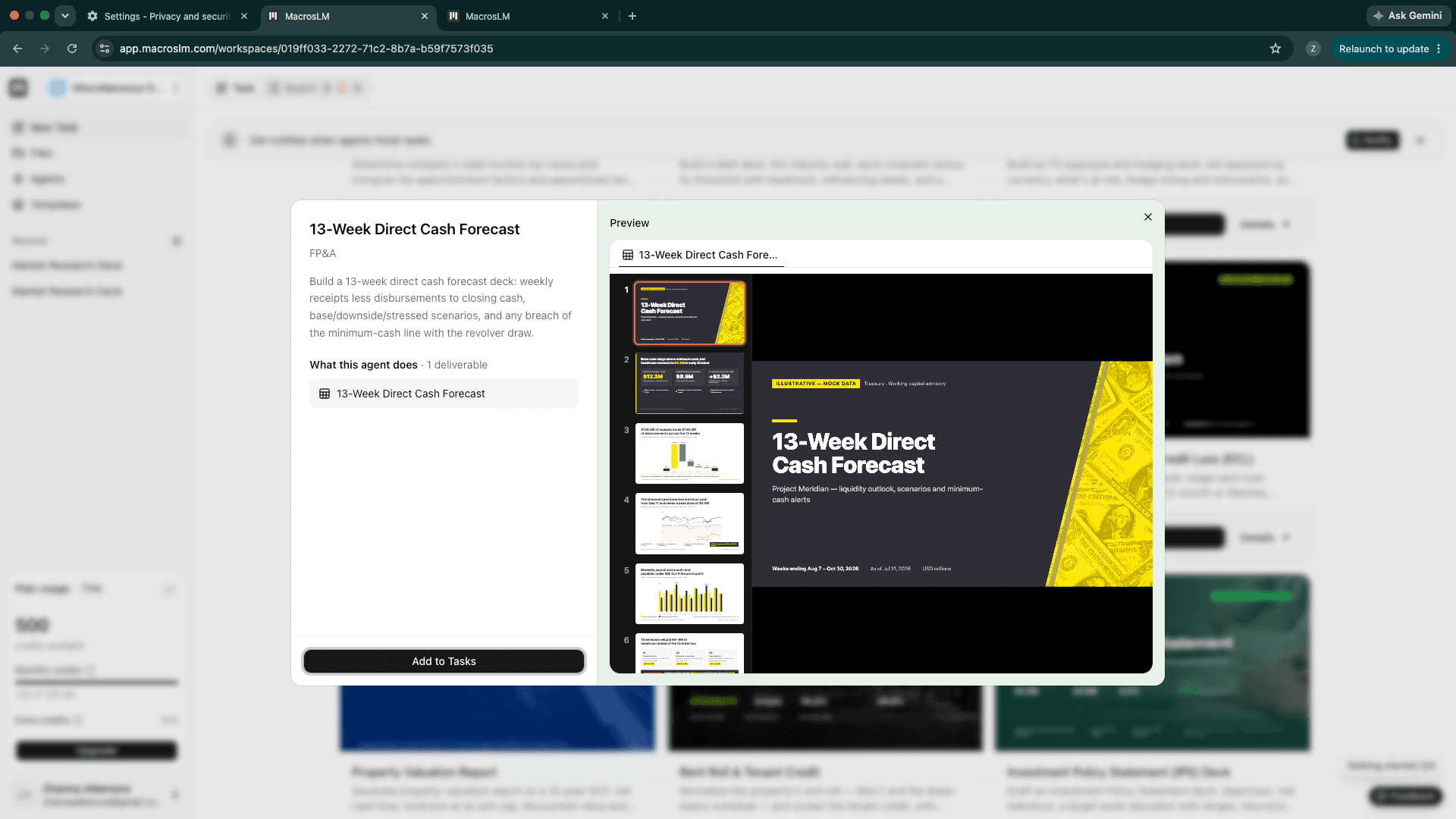
Enter a brief detailing the structure and focus of the deck. Write your own for full control, or pick a ready-made FP&A, Accounting & Month-End Close, or Financial Due Diligence agent from the agent library. Either way, select Slides as the output.
The library also includes agents scoped to a single deliverable — for the cash section here, a ready-made 13-Week Direct Cash Forecast agent builds the weekly receipts-less-disbursements deck, with base, downside, and stressed scenarios and an alert on any breach of your minimum-cash line. Add it to your tasks and it runs on its own.
"Synthesize our attached Q2 trial balance, budget variance files, and cash forecast into a 12-slide Board of Directors presentation. Include an executive P&L summary, key revenue drivers, opex variance analysis, an operating margin bridge, headcount updates, and a 13-week cash runway. Flag key risks and strategic recommendations."
Step 3: It builds, and you review on your board
Click Create to run the task. It appears on your board view, where you can track it and every other task in one place.
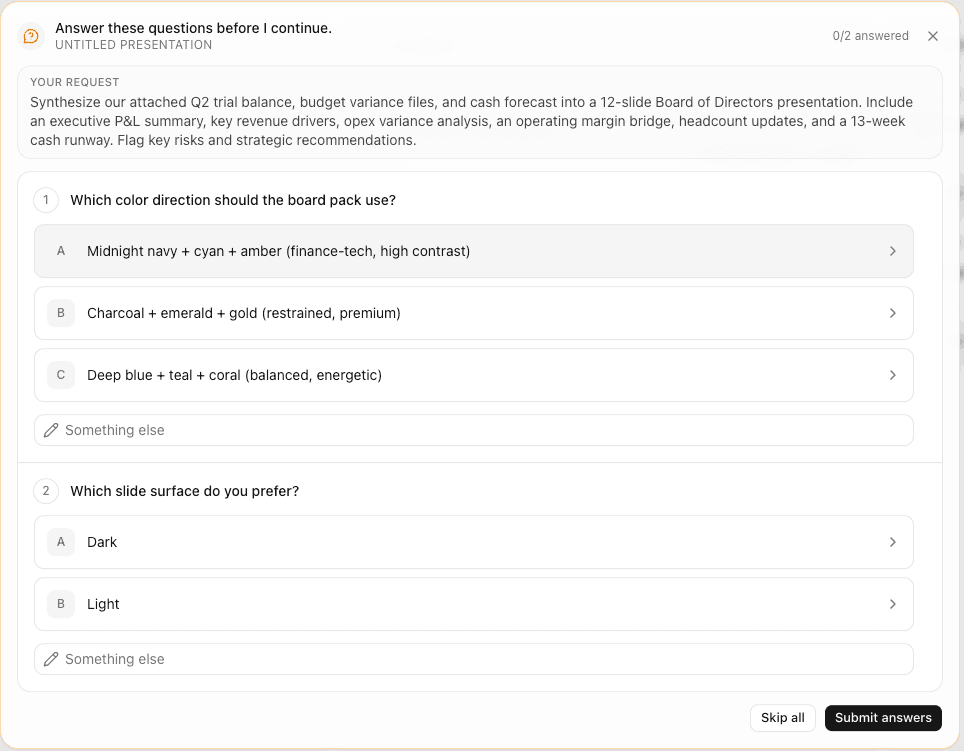
Before finalizing the slides, the FP&A agent reconciles your workbooks and — wherever your brief left something open, like a constant-currency adjustment or a preferred EBITDA add-back treatment — asks you a targeted clarifying question. You confirm the treatment as it goes, so the numbers reflect your accounting judgment rather than the agent's assumptions.
Step 4: Click any metric to verify the evidence
Minutes later, the finished board deck renders — an executive P&L, the variance analysis, the operating margin bridge, and the 13-week cash runway, all in one presentation.
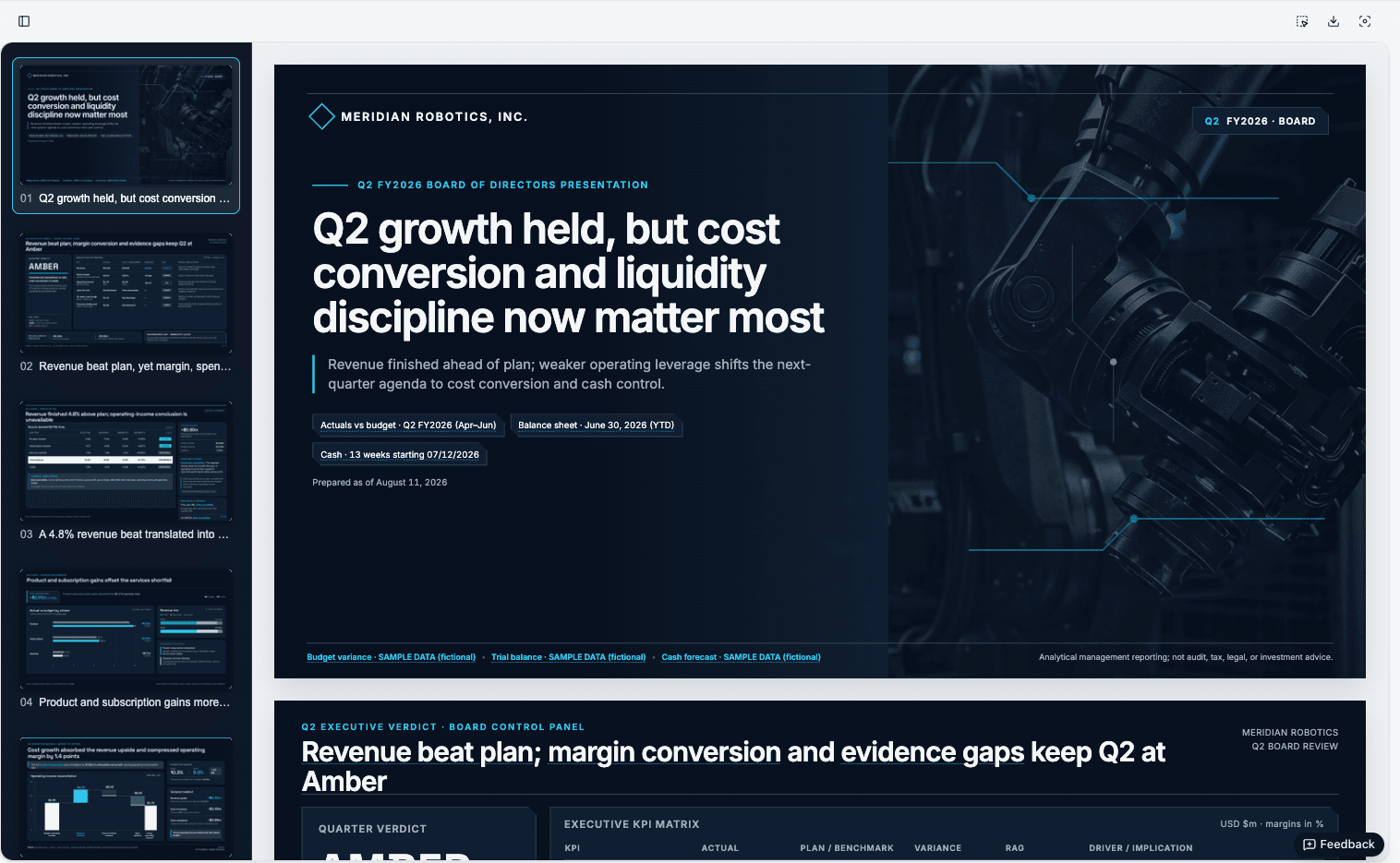
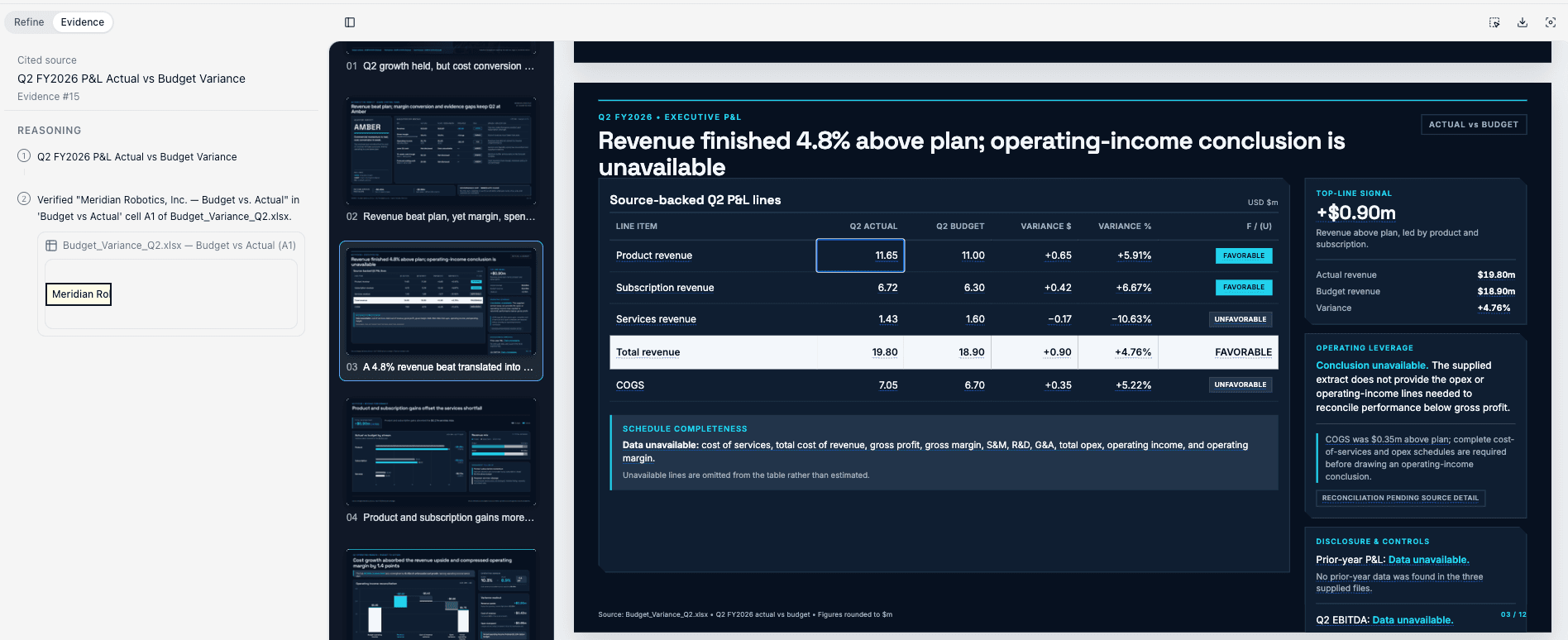
This is the core capability. Every revenue metric, margin percentage, and variance figure on your slides carries a numbered citation badge. Click it, and the Evidence panel opens to show the exact cited cell, GL row, or document page, along with the reasoning used to calculate it.
When a director asks "what drove this 8% increase in G&A?", you click the badge on the slide to reveal the underlying accounts and transactions behind the figure. That is what makes a deck defensible in the room, not just polished on the screen.
Refine any slide by just asking in the chat — reword a title, swap a chart, fix
a figure, or reframe a risk, and it updates on the fly. When you're happy with
it, download the finished deck as an editable PowerPoint (.pptx) or share it
with your colleagues straight from the workspace, ready for the boardroom.
What still belongs to you
The agents reconcile the data, do the cross-referencing, and draft the deck. These decisions stay human:
- The strategic read: what the numbers mean for the business and what to recommend.
- Accounting treatment: currency, add-backs, and reclasses are yours to confirm.
- Which risks to surface, and how to frame them for the board.
- Sign-off. Your name is on the deck, so you review every sourced figure before it ships. AI can make errors, which is exactly why every number is traceable: you verify, then you own it.
Security & governance
Board-level reporting demands security handled up front:
- Certifications: SOC 2 Type II certified; GDPR and CCPA compliant.
- No-training guarantee: your financial models, trial balances, and board templates are never used to train public or foundational models.
- Verify every figure: because each number links to its source, you can audit any figure before it ships.
The short version
To build a data-backed board deck with AI:
- Add your data: upload your ERP exports and models, connect live sources, or both.
- Brief the deck or choose an FP&A agent, and select Slides.
- Track agent progress on your board view.
- Review, click any figure to its evidence, then edit and sign off.
- Download the deck as an editable
.pptxor share it with your colleagues — ready for the boardroom.
Stop losing days to manual rekeying and slide formatting. Let the agents handle the data synthesis so you can focus on the strategic leadership the board came to hear.
Frequently asked questions
- Can AI build a board deck from raw financial data?
- Yes. A specialized workspace like MacrosLM reads raw trial balances, budget variance files, and GL exports and drafts a board-ready presentation with the P&L summary, variance analysis, and cash forecast in place. The figures are derived from your own data and each one links back to its source, so you can defend them in the meeting.
- Will AI misinterpret my accounting logic?
- Any AI can make errors, which is why traceability matters more than a promise of perfection. Every figure links to the exact GL row, cell, or filing it came from, and the agent asks clarifying questions on judgment calls like constant-currency or EBITDA add-backs, so you confirm the treatment and verify each number before the board sees it.
- What files can I use to build the presentation?
- Upload raw ERP exports, trial balances, budget variance workbooks, GL dumps, headcount models, and PDF statements, and connect live sources such as web search, SEC EDGAR, Companies House, FRED, and World Bank. Files are supported up to 25 MB each.
- Can the deck match our corporate template?
- Yes. Upload your board-deck template or report styling during setup and MacrosLM copies its visual hierarchy, fonts, and colors when it builds the presentation, so the output lands in your house style.
- Is our financial data used to train AI models?
- No. MacrosLM is SOC 2 Type II certified and GDPR and CCPA compliant, and your financial models, trial balances, and board templates are never used to train public or foundational models.
Reviewed by Damira Baigozha
ex-PwC Valuation & M&A Advisory Expert. Written by the MacrosLM editorial team.
View profile →